The Preferences window allows you to modify platform related and connection settings. In order to get to the Preferences window, simply click on the View menu and select "Preferences".
Depending on which Menu Level ROBOTC is currently set to (Basic, Expert, or Super User), the options in the Preferences window will change.
View Menu - Basic Mode
There are three main tabs in the Preferences window while in Basic Mode:
Quick Setup:
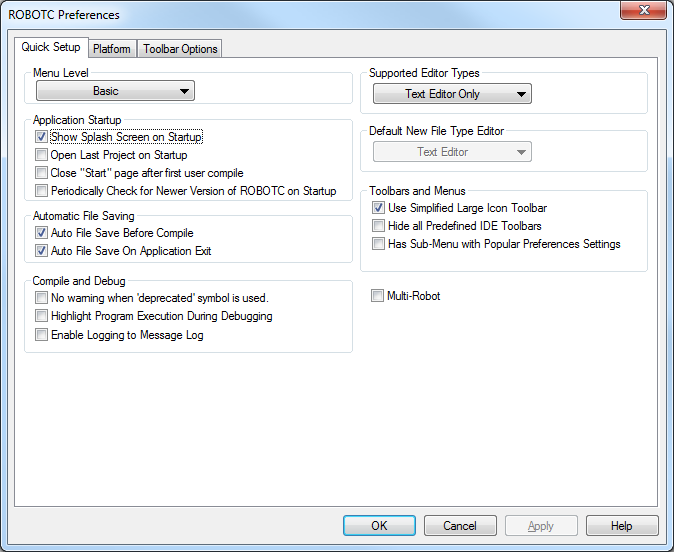
Contains the most commonly used settings
- Menu Level
- Allows you to set the current Menu Level to Basic, Expert, or Super User
- Application Startup
- Show Splash Screen on Startup: Enables and disables the splash screen from appearing when ROBOTC is loaded (on by default)
- Open Last Project on Startup: Automatically opens the programs previously open when ROBOTC was last closed (off by default)
- Close "Start" page after first user compile: Automatically closes the ROBOTC start page after the user compiles a program (off by default)
- Periodically Check for Newer Version of ROBOTC on Startup: Automatically checks ROBOTC for a new version upon starting up (off by default)
- Automatic File Saving
- Auto File Save Before Compile: Automatically saves the currently open program before compiling (on by default)
- Auto File Save on Application Exit: Automatically saves the currently open program when exiting ROBOTC (on by default)
- Compile and Debug
- No warning when 'deprecated' symbol is used: Prevents ROBOTCfrom generating a message in the 'Errors' pane when a deprecated (outdated) command, symbol, or function is called in a user program (off by default)
- Highlight Program Execution During Debugging: Automatically highlights program execution, line by line, in ROBOTC as program is being run. Useful for debugging (off by default)
- Enable Logging to Message Log: Advanced debugging tool that shows the communication status between ROBOTC and a robot brain. Useful for advanced debugging (off by default)
- Supported Editor Types
- Decides whether ROBOTC is in its Graphical or Text-Based programming mode.
- Default New File Type Editor
- Defaults to the supported editor type selected above.
- Toolbars and Menus
- Use Simplified Large Icon Toolbar: Enables and disables large icon simple toolbar (on) or standard IDE toolbar (off) (on by default)
- Hide all Predefined IDE Toolbars
- Has Sub-Menu with Popular Preferences Settings: Adds a sub menu to the Preferences option on the "View" menu that allows you to quickly change the most common preference settings (off by default)
- Multi-Robot
Platform:
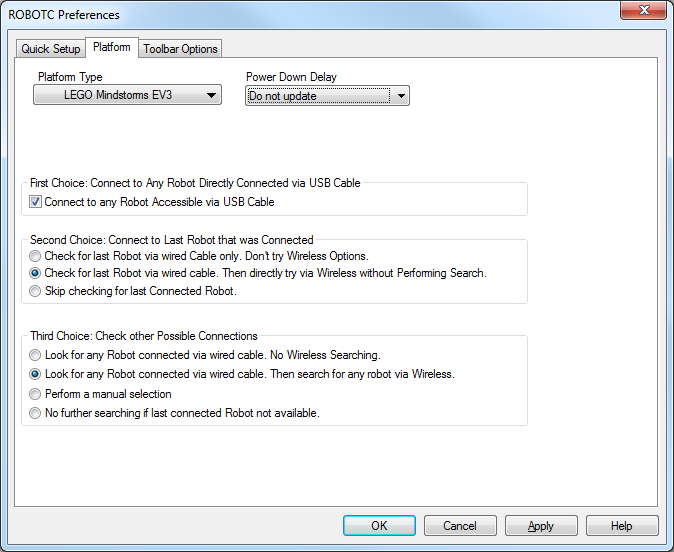
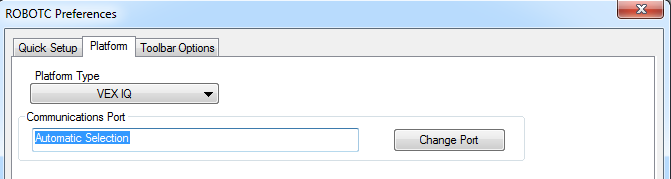
Used to set the Platform Type for the compiler and which port ROBOTC should use for communication with the selected microprocessor.
- Platform Type
- Allows you to select between the VEX Cortex and VEX IQ platform types.
- Allows you to select between the NXT and EV3 platform types.
- Can also be changed through the 'Robot -> Platform Type' menu option.
- Communications Port
- Displays which port is specified for communications with the VEX Cortex or IQ microprocessor. Can be changed by clicking on the 'Change Port' button. Can also be changed through the 'View -> Select Communications Port' menu option. Automatic Selection is the default value.
- Power Down Delay
- This setting adjusts the time it takes for the robot brick to automatically power down. The default setting is set to never shut down the robot automatically.
- First Choice: Connect to Any Robot Connected via USB
- Checking this box allows ROBOTC to communicate with any robot brick that's connected to the computer with the USB cable (on by default)
- Second Choice: Connect to Last Robot that was Connected
- If ROBOTC cannot find any robot by USB (or if First Choice is disabled), it will attempt to find the last robot that it connected to. By default, it will search first for that robot on the USB cable, then on wireless connections.
- You can also set ROBOTC to only attempt to connect to the previous robot via USB, or to not attempt to find the previous Robot at all.
- Third Choice: Check other Possible Connections
- If the previous Robot isn't found, then ROBOTC will attempt to find any Robot connected to the computer, first through USB wires, then through Bluetooth.
- You can also set it to check again for any Robots connected through Bluetooth, perform a manual selection, or not check again for another connection.
Toolbar Options:

Used to configure the display of the toolbars in ROBOTC
- Many Toolbars using Small Icons (Legacy)
- This is the 'standard' toolbar configuration used in many other IDE's and in previous versions of ROBOTC
- Single Toolbar with Large Icons
- This is the new toolbar configuration for ROBOTC 4.0, with large buttons in place for commonly used actions such as Compile, Download to Robot, and Firmware Download.
- Text at Right
- Changes the display on the large buttons. It is set by default to "Text at right" (i.e. text on the right of icons) but can also be changed to "Icons Only," "Text Only," and "Text on Bottom."