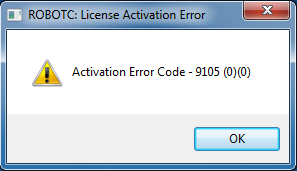
When activating ROBOTC you may receive an error message with an error code in the 9XXX family. These errors occur because something on the local network or computer (in most cases, something such as a proxy server or security software) is blocking ROBOTC from reaching its activation servers.
The easiest way to overcome this is to temporary bypass the restrictions on the computers that need ROBOTC activated. Once ROBOTC is activated once, it shouldn't need activated again unless major changes are made to the computer or ROBOTC. If you are activating ROBOTC through a proxy server, please see the guide linked below for instructions on how to do so:
Activating ROBOTC - Proxy Server
If the restrictions cannot be bypassed, you will need to unblock two specific domains for ROBOTC to activate:
https://secure.softwarekey.com/ (This is the activation server; uses ports 80 and 443)
www.robotc.net (This is our homepage, used to update the startup splash page)
http://www.robotc.net/xml/robotc.xml (This is the location of the specific xml file used by the splash page)
Please make sure that SSL communications are not blocked on your computer or network, as this protocol is used by ROBOTC when communicating with its activation servers. You can test the computer's ability to connect to the ROBOTC servers by navigating to https://secure.softwarekey.com/solo/customers/CustomerHome.aspx and logging in using your license ID and password.
If you can log in fully, that more than likely means that the ROBOTC program itself is being locked down from reaching the servers (which can be caused by security programs or other restrictions in place on that computer).
Also, you can test the computer's ability to connect to the activation server by navigating to https://secure.softwarekey.com/solo/webservices/XmlActivationService/
Please note that you will not be able to activate ROBOTC through a SOCKS-based proxy server. However, ROBOTC can be activated through HTTP/HTTPS based proxy servers (even if they are a part of a VPN setup).